Feedback

Emergency Access

Life happens. But it shouldn't put your passwords, accounts, and sensitive data at risk. Make sure someone you trust can access your VMP™ Pass account in the event of an emergency.

Lost passwords don't stay lost with
VMP™ Pass

Your digital life is worth protecting. You need to ensure someone you trust can access your accounts and secure notes in the event of a healthcare emergency or death. VMP™ Pass Emergency Access provides exactly that peace of mind.

Think of it as your personal emergency contact for your digital life. If you or a member of your VMP™ Pass Families account can't access your account, a designated emergency contact can step in and gain temporary access to your account and Vault for a specified time period.

Users can use our Emergency Access premium feature to:

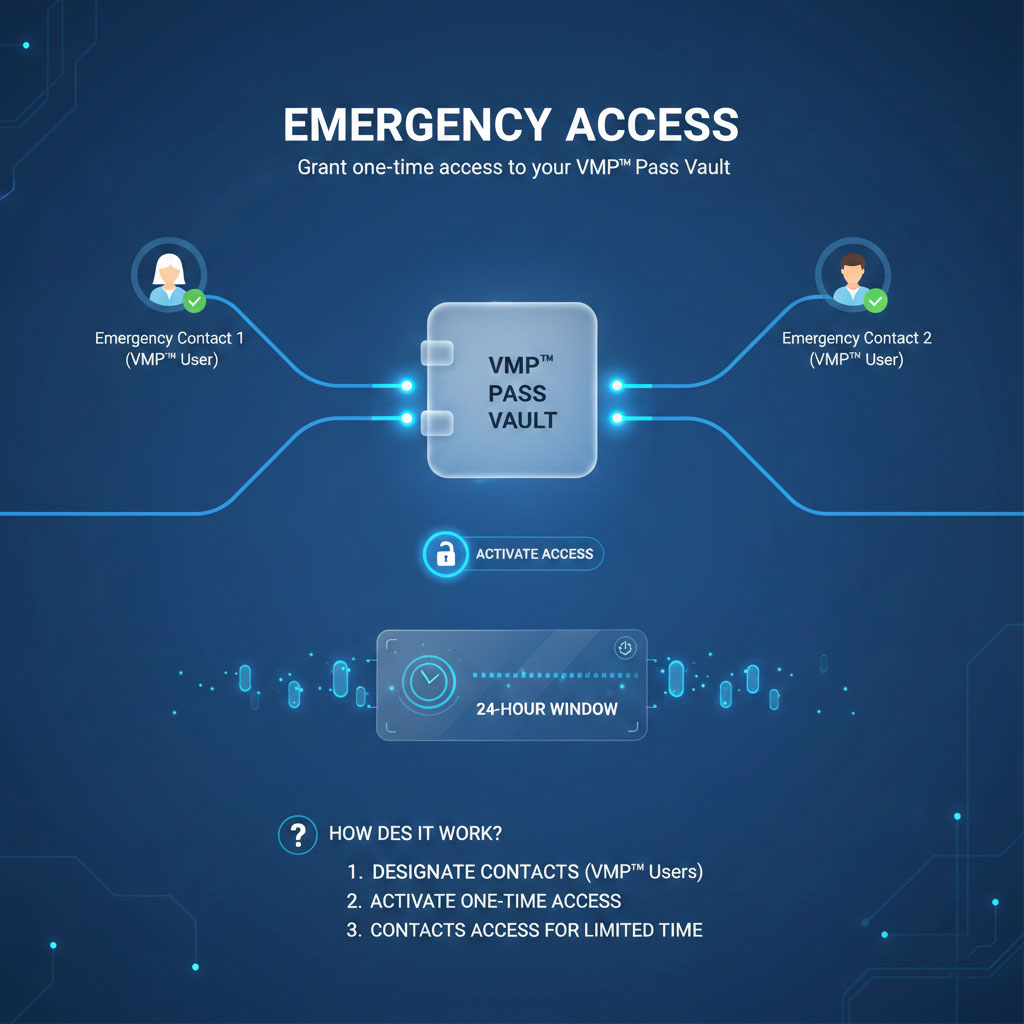
  • Designate multiple emergency contacts who are also VMP™ Pass users – protecting you in case of physical harm, accidents, or medical emergencies.
  • Support aging parents by ensuring you have access to their account information and digital assets – including passwords, mortgage details, health insurance documents, wills, and other critical information.
  • Grant vault access to your children or trusted family members if your health is in serious jeopardy.
Emergency Access Interface

How to use emergency access

With Emergency Access, you can grant one-time access to your VMP™ Pass Vault to one or more designated emergency contacts – who are also VMP™ Pass users. Yet, how does it work?

Emergency Access Interface

Imagine you have an aging parent suffering from a critical, late-stage medical condition. They haven't shared their email password with you, and you urgently need to access their financial accounts and pay their bills.

Rather than searching through paper notes or trying to guess passwords, you can set up and request access to their account through Emergency Access with the following steps:

1. Request Emergency Access

Ask them to add you as an emergency contact by entering your email and specifying a wait time – the period between when an Emergency Access user can request access and when they can actually view your account.

2. Wait and Access

Log in to your VMP™ Pass account and accept their invitation. When emergency access is needed, request access through your vault's Emergency Access section. Once the waiting period expires and they haven't denied your request, you'll be granted access. You can then view their account in read-only mode to retrieve necessary information.

Make sure someone's there for you when you need it most

Password loss can be devastating. As we store more of our lives online, it's essential to have a contingency plan to protect our accounts, data, and information for our loved ones. Emergency Access gives your friends and family safe access to your passwords, accounts, and Vault during a health crisis or other personal emergency.

Whether you want to help one friend or multiple family members, Emergency Access allows you to add multiple emergency contacts. In an emergency situation, you can designate who you believe is best equipped to handle your digital affairs. Your passwords remain secure and hidden—even your emergency contacts won't see them unless they're granted access.

Access is only granted when you approve it. By setting a wait time when designating contacts, you give yourself the opportunity to deny access if needed, maintaining control even during difficult circumstances.

With Emergency Access, you have one less thing to worry about. Even if you're hospitalized or unable to respond, you still maintain control of your family finances. Upon hearing news of your accident, your designated emergency contact can request Emergency Access to your Vault.

You can approve or deny access requests to protect your account. If the wait time passes without action on your part—which likely means the request was justified and you're unable to respond—access will be automatically granted.


Couple embracing

Learn More about VMP™ Pass Features

User Management

Manage family account users with granular control over password and folder sharing permissions.

Password Sharing

Safely share passwords, credentials, and secure notes with people you trust.

Security dashboard

Your one place to check the health and security of passwords and accounts.

Password vault

An encrypted, safe location for all your passwords, notes, files and more.

Start your VMP™ Pass trial

Free for 30 days.